All I wanted was to learn how to play guitar, but ended up building a DIY kit for it.
https://github.com/orhun/tuitar
In the beginning of 2025, I picked up playing guitar again after a long break, thanks to the encouragement of a friend. It was fun at first but my engineer mind wanted to optimize the learning process somehow. I'm sure it would be better if I took my time, but it wasn't for me to wait until I could play properly. I needed practical knowledge right away, so that I could include simple chords and solos in my music. I needed a shortcut to unblock myself, otherwise I felt like my creativity was stifled.
That's when I decided to build a tool to practice electric guitar, without even an idea of what that would look like. As if that wasn't enough craziness, I also submitted this project idea to the Rust Forge conference so that I could speedrun the development if the talk got accepted. (i.e. talk-driven development: set a deadline and become responsible to deliver something)
Coincidentally, the Ratatui project had a new backend called Mousefood at the time. This allowed running terminal UIs on embedded devices (e.g. ESP32). This seemed like a perfect opportunity to hack with terminal UIs, embedded and guitar tooling. However, since I still wasn't confident about what to build, I took a trip to Berlin in May to visit Superbooth (a huge synthesizer fair). In the end, I had more inspiration than I needed.
Ok, it seems like you are getting a bit sidetracked. I mean, getting excited about synthesizers is cool and all, but what about the guitar tool?
Oh yeah, that. My talk got accepted. So it was time to roll up my sleeves. I realized if I overthink this, I would never get started. So I decided to make a very simple guitar tuner first. (Of course, not embedded yet, just a terminal app.)
1. Get audio input from the microphone (using cpal)
2. Perform FFT on the audio input (using rustfft)
3. Find the fundamental frequency and map it to a musical note (using pitchy)
4. Plot everything on a chart (using ratatui)
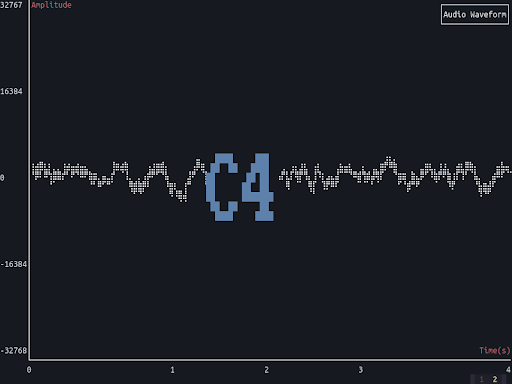
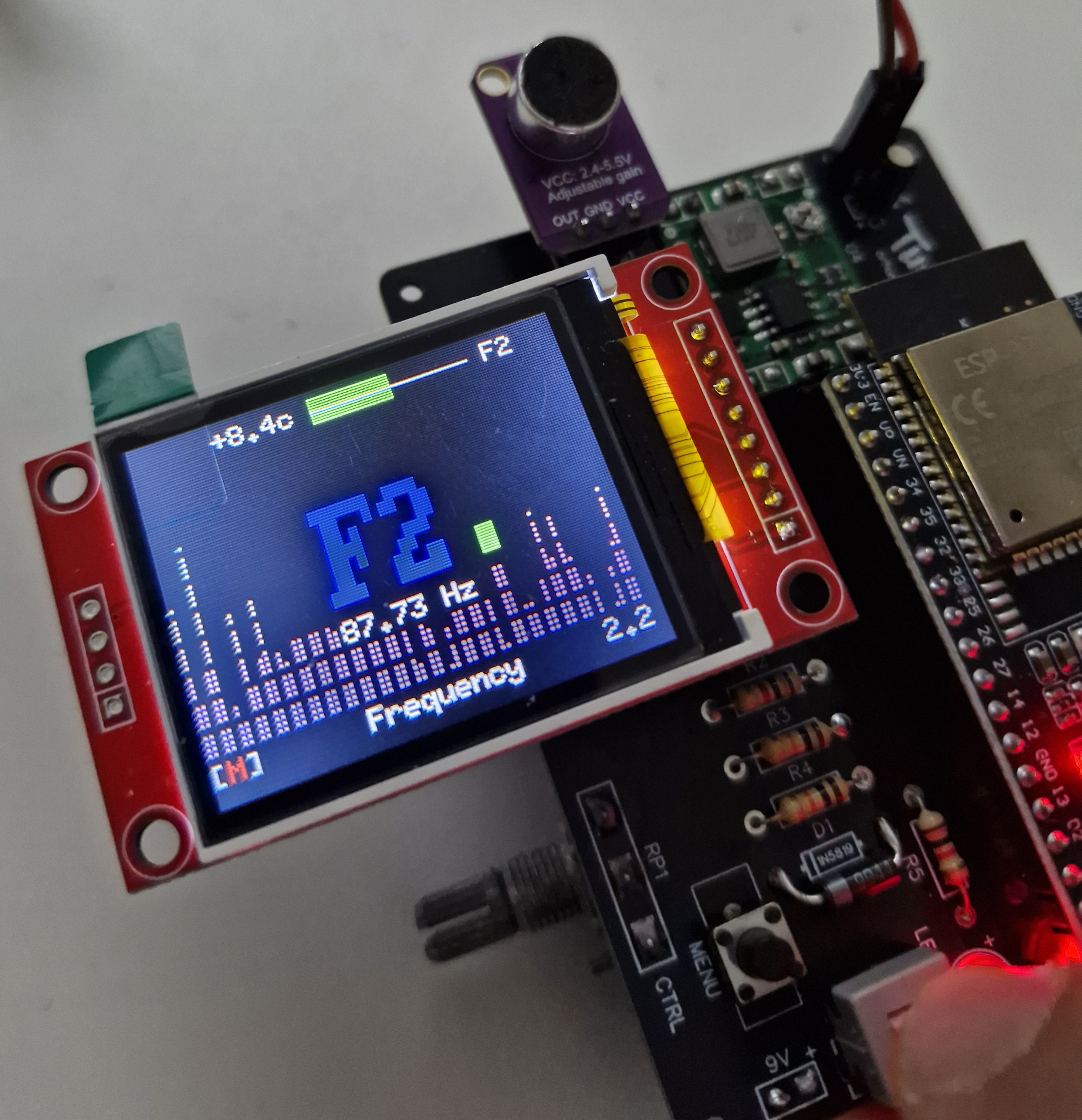
That was some progress and it motivated me to keep going. The next step was to port this simple MVP to embedded. I quickly locally-purchased an MAX4466 microphone module and ESP32 T-Display to start experimenting.
For context, the Mousefood backend works by translating terminal cells into embedded-graphics text primitives and pushes them onto any DrawTarget (usually a display driver e.g. in my case it is the tiny screen on ESP32 T-Display).
So it's basically a framebuffer... How about the toolchain needed for this?
On ESP32, the main Rust frameworks are ESP-HAL (no_std) and ESP-IDF-HAL (std). ESP-IDF-HAL is a wrapper around Espressif's official SDK (ESP-IDF) and it has better support for peripherals. However, it is a bit heavy for small applications since it includes FreeRTOS and other components. ESP-HAL is a pure Rust implementation and it is more lightweight.
Today, Ratatui/mousefood supports no_std after the 0.30 release. Back then, my only option was to go with ESP-IDF-HAL and include the standard library and a bunch of other C dependencies.
It's fine though! We are only prototyping, right?
Unfortunately, it was more painful than you would expect.
Setting up the toolchain was so cursed that at some point I needed to symlink a legacy soname (libxml2.so.2.13.8 as libxml2.so.2) for compatibility. In the end, I was able to render a rectangle using Ratatui though.
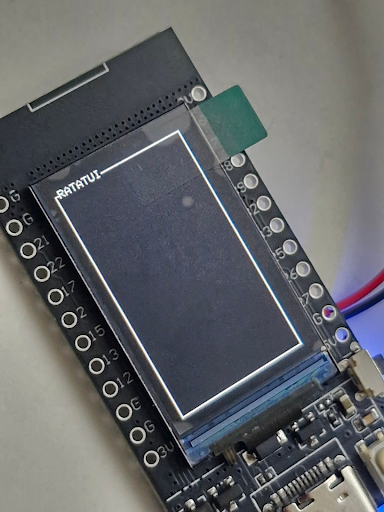
Is this how the progress look like? Just a tiny rectangle?
Chill... let me hook up the microphone. It's just a matter of changing the cpal input with a MAX4466 connected to an ADC pin and we should be able to do pitch detection inside of this tiny rectangle. Just need to change the callback and the rest should work the same.
let sample_callback = |data: &[i16], _| { };
let sample_rate = supported_config.sample_rate.0;
Just change that with:
let sample = mic_adc_channel.read().unwrap_or(0);
let sample_rate = /* ??? */;
Wait... we know the sample rate of my computer's microphone. But what's the sample rate of this tiny analog microphone module? That doesn't really work with what I have already. And why all of a sudden this rustfft function is crashing now? I forgot I had only 520 KB of RAM. Ugh!
Just use microfft for doing FFT bro. But I ain't know nothing about that sample rate issue. Maybe ask a friend.
Yeah, that's what I did. We had a fun one hour trying to figure out stuff and went over the rough edges.
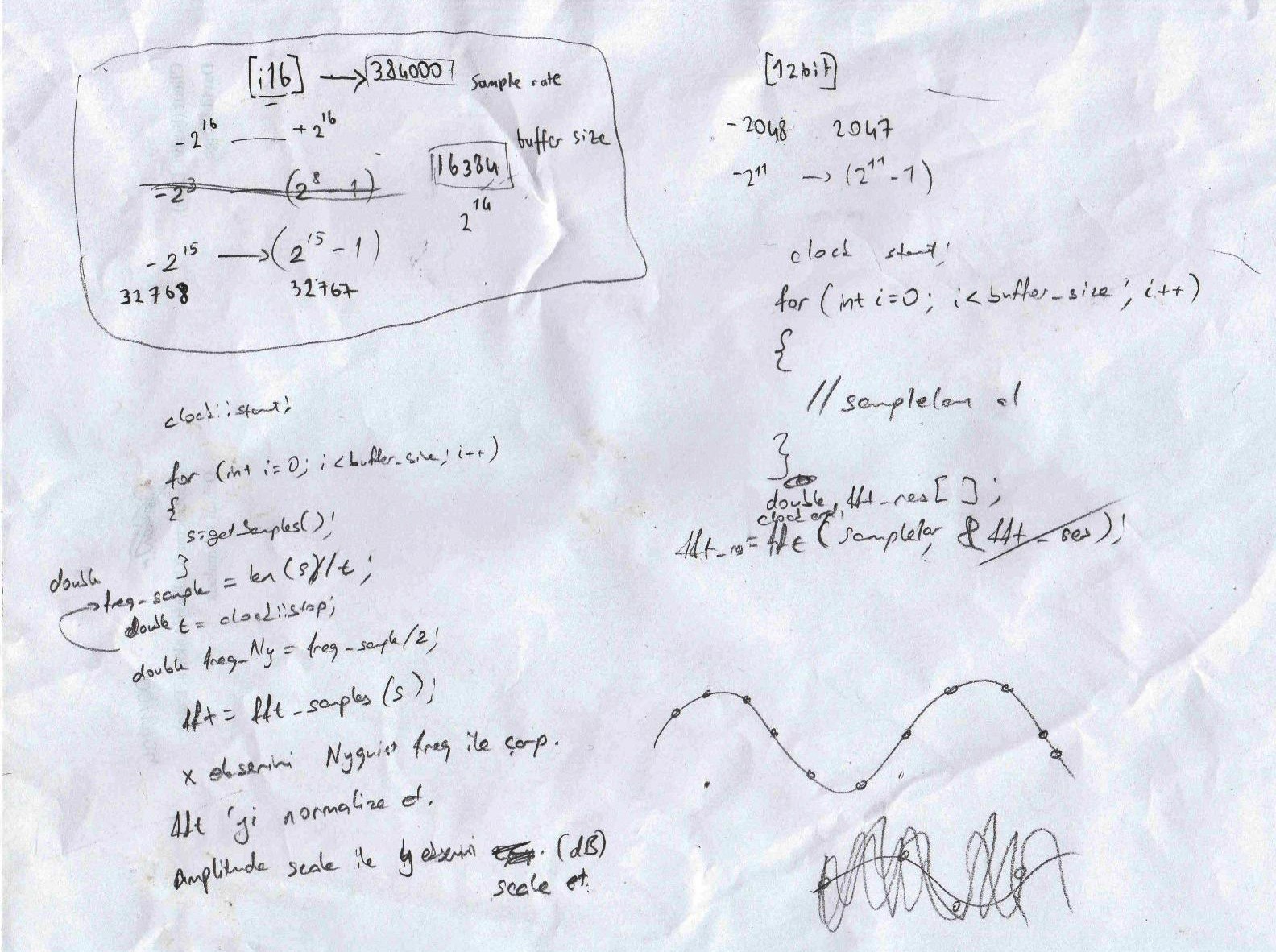
The real engineering sometimes happens on a piece of paper... that no one can read.
It turns out, I can just use a dynamic sample rate. I tried many fancy things (like using scoped threads to read the samples) but the following is a simple loop which just worked fine:
let mut samples = Vec::with_capacity(512);
let adc = AdcDriver::new(peripherals.adc1);
let mut mic_adc_channel = AdcChannelDriver::new(adc, peripherals.pins.gpio36, &cfg);

loop {
    let instant = Instant::now();
    while samples.len() < 512 {
        let sample = mic_adc_channel.read().unwrap_or(0);
        samples.push(sample);
    }

    transform.process(&samples);

    let elapsed = instant.elapsed();
    let sample_rate =
        samples.len() as f64 / elapsed.as_secs_f64();

    /* render UI */
}
Continuously fill a buffer with 512 samples as fast as possible, process them, then derive the sample rate by dividing the number of samples by the elapsed wall-clock time. Profit.
Next, add some Ratatui magic (e.g. widgets) on top and I got myself a tiny guitar tuner:
That's cool, I guess this alone is already helpful for learning guitar. So the next step is to practice some jams and start preparing the talk?
I mean I could do that. But how about we push this thing a bit further? I mean, you are a rat and I'm surprised why you haven't asked about that rat magic. How about we implement a Ratatui fretboard widget and show the played notes real-time?
You got me. I forgot we are literally rendering terminal UIs on a tiny screen. Rendering a fretboard with unicode characters would be straightforward
It was!
let fretboard = Fretboard::default();
let mut state = FretboardState::default();
state.set_active_note(Note::A(4));
frame.render_stateful_widget(fretboard, area, &mut state);
E4 ║─┼───┼───┼───┼───┼⬤─┼───┼───┼───┼───┼───┼───║
B3 ║─┼───┼───┼───┼───┼───┼───┼───┼───┼───┼⬤─┼───║
G3 ║─┼───┼───┼───┼───┼───┼───┼───┼───┼───┼───┼───║
D3 ║─┼───┼───┼─•─┼───┼─•─┼───┼─•─┼───┼─•─┼───┼───║
A2 ║─┼───┼───┼───┼───┼───┼───┼───┼───┼───┼───┼───║
E2 ║─┼───┼───┼───┼───┼───┼───┼───┼───┼───┼───┼───║
1 2 3 4 5 6 7 8 9 10 11 12I also made the ratatui-fretboard very customizable so that if I get a bass guitar in the future I could also support that. (I recently got a bass guitar btw)
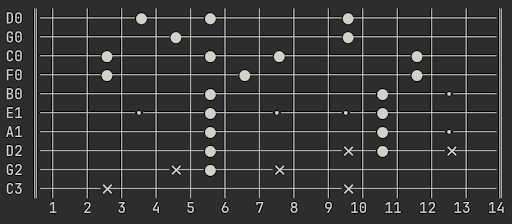 Tbh you can also render things like this but pls don't.
The result was satisfying to see:
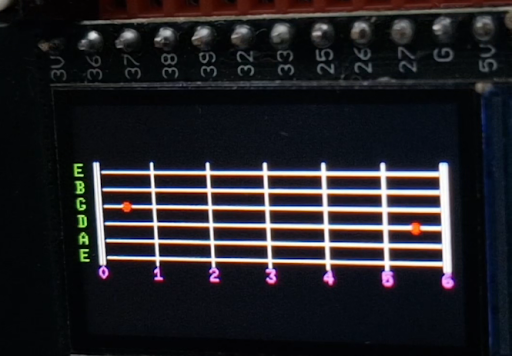
At that stage, I was still testing things with an online tone generator. I would simply play 440Hz and expect to see that A4 note detected on the display. Or I would simply play my classical guitar sometimes.
With the excitement of seeing this fretboard widget work, I decided to pick up my electric guitar and give this a spin. But guess what was wrong... it wasn't possible to get a reliable read without cranking up the guitar amplifier's volume and waking up my neighbors.
Ah I see... Maybe connect your electric guitar directly to this somehow? I mean... It's electric, right? Just connect the 6.35mm jack to the same ADC pins that you use for reading the samples from the MAX4466 module.
Uh... I listened to the advice of a rat and it didn't work...
Maybe the signal is too weak? Use a low-power dual operational amplifier (op-amp) such as LM358 to amplify the signal. It's a tiny electrical component that has 8 pins. You simply power it from an external source and it makes small voltage signals bigger and easier for the ADC to read.
But then we will need more voltage, right?
Essentially, yes. Let's power everything from a 9V battery. You need to regulate the voltage to power the ESP32 though... It uses 3V.
Yes, yes. I tried out AMS1117 for regulating the voltage but that heats up too much and makes the display jittery. I think I will go with a buck converter such as the MP1584 for more efficiency. It might be more noisy on the circuit compared to AMS1117 but at least it runs cool.
But hold on a second, how do you know all of these electronics things again?
That's how we started programming, remember? Hacking DIY projects back in the PIC microcontrollers era and making our own development board as a competitor to Arduino. It was all before Rust and the world was a different place back then. But hey, did it work?
Yes sir! I connected my guitar to this and can see the played notes real-time!
Looks cool, but how do you even see this tiny screen if you place this device far from you?
Uhhh... I don't...
That's why it was time to upgrade. Instead of using ESP32 T-Display, I wanted an external display and another ESP32 controller. I locally sourced these two components:
|
TFT SPI 120×160 (v1.1)
|
ESP32-WROOM-32D
|
I figured out the correct pins, connected everything together and it worked.
let peripherals = Peripherals::take()?;
let spi = peripherals.spi2;
let sclk = peripherals.pins.gpio14;
let sdo = peripherals.pins.gpio13;
let sdi = Option::<esp_idf_svc::hal::gpio::Gpio0>::None;
let cs = Some(peripherals.pins.gpio25);
let rst = PinDriver::output(peripherals.pins.gpio33)?;
let dc = PinDriver::output(peripherals.pins.gpio27)?;
let driver_config = Default::default();
let spi_config = SpiConfig::new().baudrate(40u32.MHz().into());
let spi = SpiDeviceDriver::new_single(spi, sclk, sdo, sdi, cs, &driver_config, &spi_config)?;
let mut display = ST7735::new(
    spi, dc, rst, true, false, 160, 128
);
let backend = EmbeddedBackend::new(&mut display, EmbeddedBackendConfig::default());
Then it didn't work for a while. Then it worked again. I have no idea what's going on…
Hey rat chef, can you take a look at the connections for me and tell me what might be wrong?
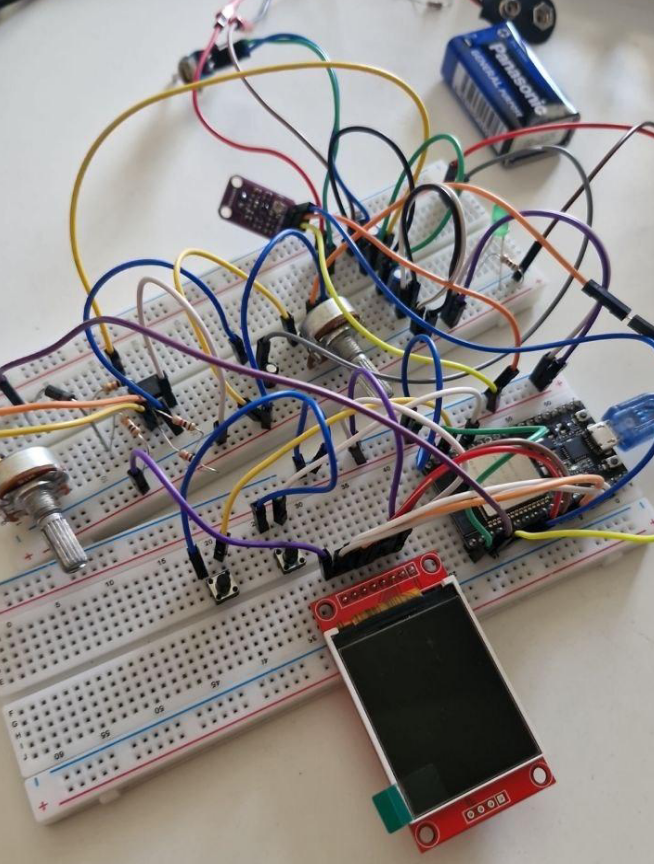
Holy cheese... It looks like doing everything on a breadboard might be the problem here. The connections might be loose, there might be noise from the components or anything could happen. Let's make a PCB and wrap this up.
While we're at it, let's have a proper name for this project and a logo. I have so many ideas to implement too!
How about Tuitar? GUIs vs TUIs, you know... You are essentially running a TUI to learn GUItar.
Haha brilliant!
Next steps: create schematics, design PCB, order it from JLC, solder everything, hope for the best.
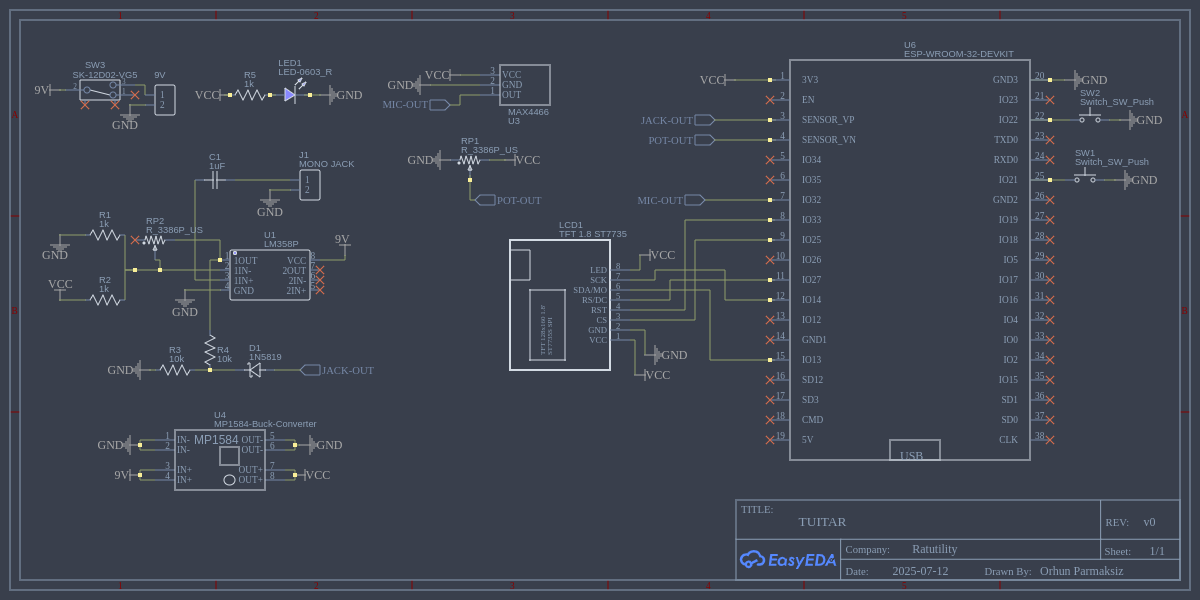
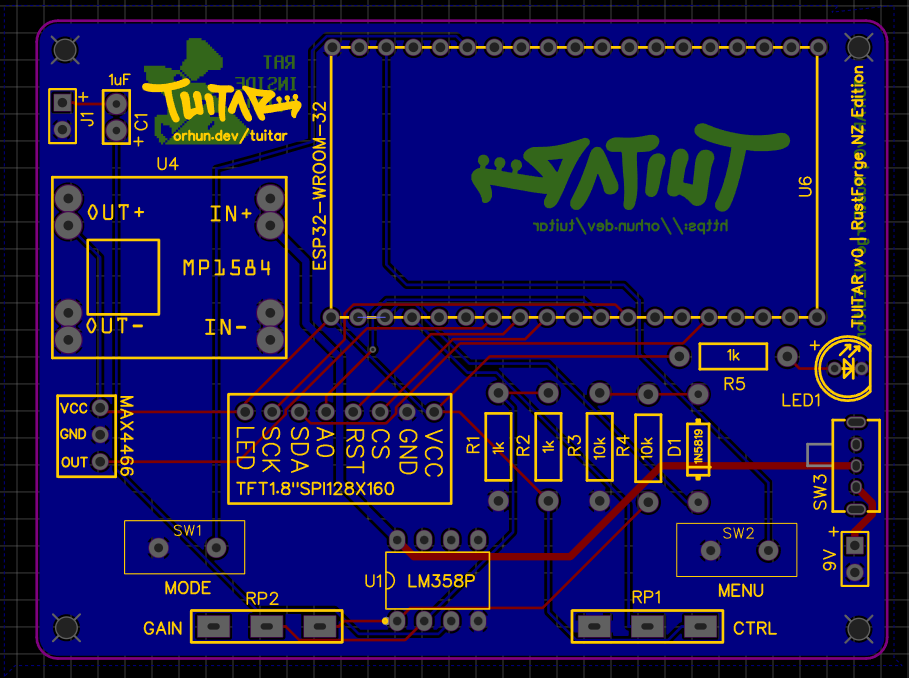
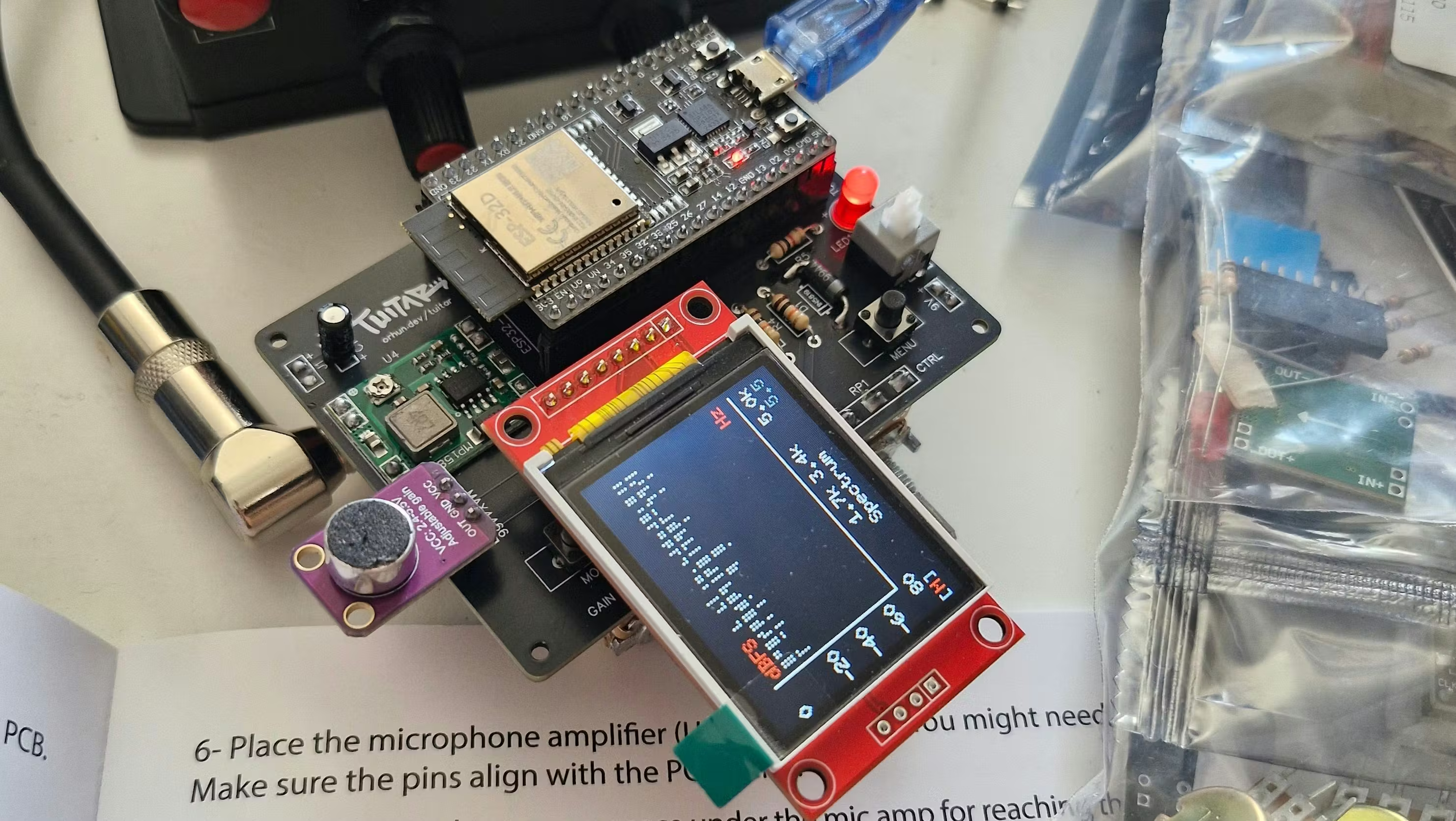
And here is the final PCB:
While doing this, I also wrote every step down the assembly (with pictures) and printed a small booklet from it. Thinking that this will be a DIY kit one day.
How about we add a couple of other modes to this though? For example, a “Tuitar” hero, or something that you can load songs and practice?
Good idea. I can also polish the UI/UX a lot! I have 2 buttons and 2 potentiometers to tweak things. I also need to add more colors and styles.
Here is the random mode (aka Tuitar hero):
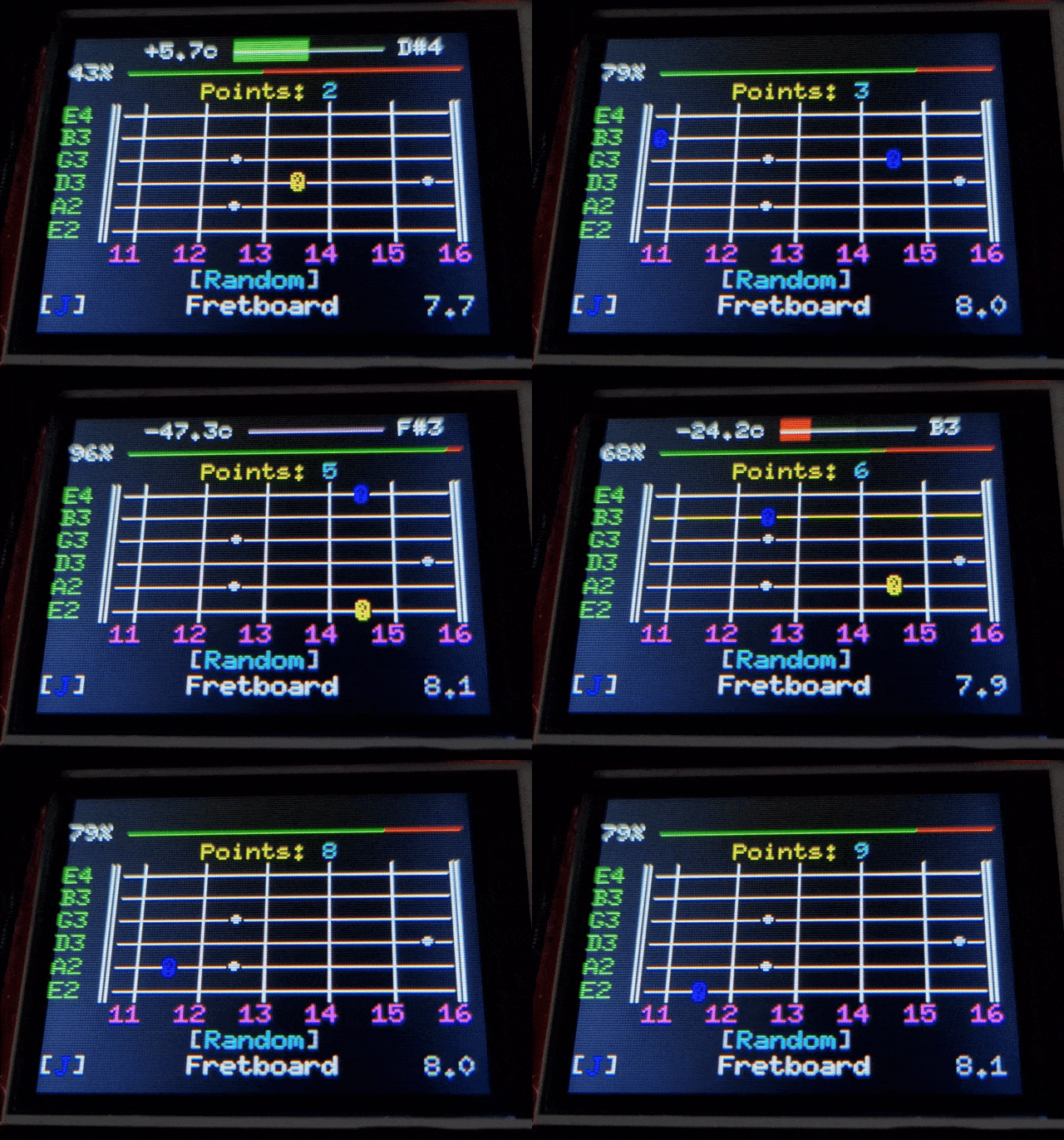
A random note on the fretboard is shown, you play it in the given time and get points.
Implementing the "song mode" was more difficult though. Firstly, I had to purchase a pro plan from Songsterr to download the MIDI files of the songs that I want to load to the device. Speaking of, I decided to support both MIDI and Guitar Pro formats with midly and guitarpro libraries.
We can't parse these MIDI files during runtime though. 512kb RAM, remember?
Yup, that's why I parse them during build time and simply ship them as a part of the firmware for now. I know I know… I can do so many other things instead (e.g. this ESP32 device has Wi-Fi and Bluetooth). But remember, I'm still prototyping!!! (if you believe that)
Parsing MIDI files looks like this:
Smf::parse(data)
    .tracks[track] // select track
    .iter()
    .filter_map(|e| match e.kind {
        TrackEventKind::Midi {
            message: MidiMessage::NoteOn { key, vel },
            channel,
        } if channel != 9 && vel > 0 => {
            Some(
                // midi to note
            )
        }
        _ => None,
    })
    .map(|n| vec![n]) // group notes per beat (simplified)
    .collect()
And then I generate a "notes array" at build time (i.e. in build.rs):
let mut code = String::new();
code.push_str("pub struct Song { pub name: &'static str, pub notes: &'static [&'static str] }\n\n");
code.push_str("pub const DEMO: Song = Song {\n");
code.push_str("    name: \"Demo Song\",\n");
code.push_str("    notes: &[\n");
for n in notes { code.push_str(&format!("        {n},\n")); }
code.push_str("    ],\n};\n");
This way I can practice the songs by playing note-by-note!
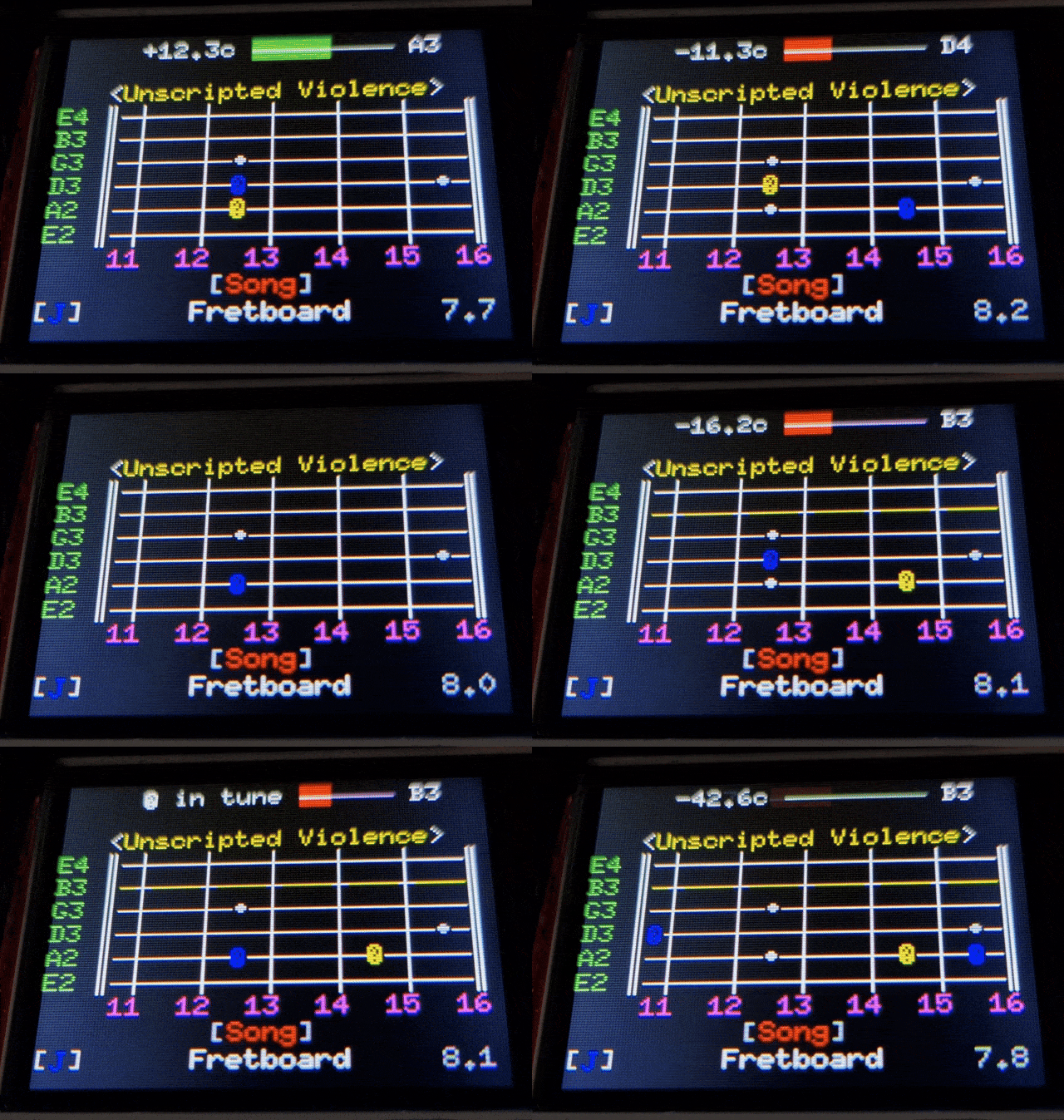
In other words, if I play the shown note it disappears and the next one is being shown. There is no metronome or other controls yet though.
Fast forward to the future...
Did you go to New Zealand?
Yes... I live-demoed Tuitar and gave away one of the prototype kits. It has already been built and working fine! Hopefully it will help someone learn the guitar in other parts of the world.
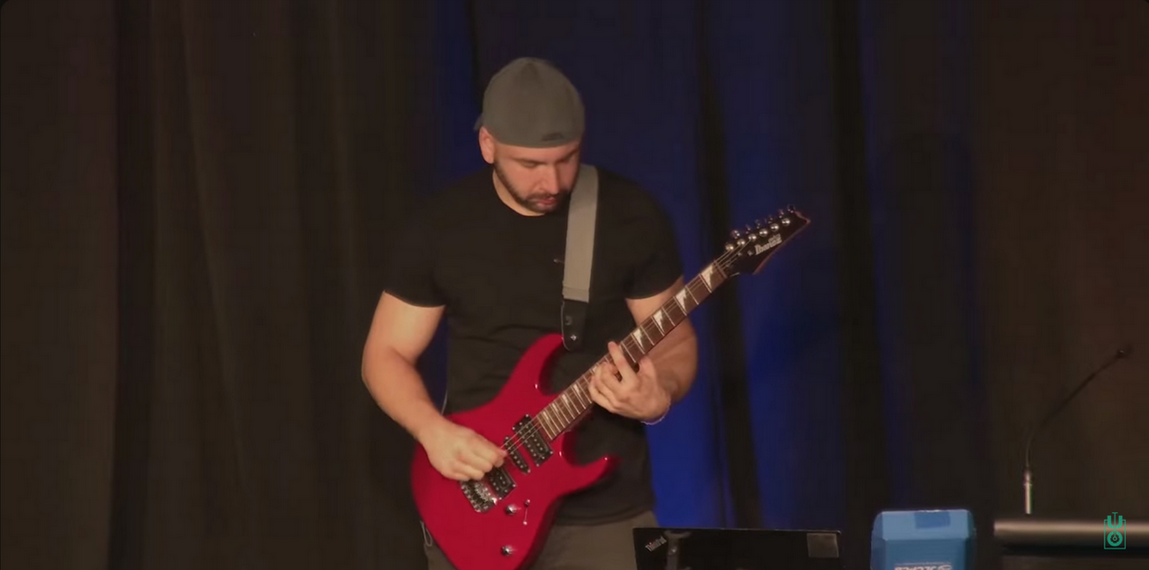
P.S. All of the development was recorded.
I built Tuitar on livestream as a part of a series called Becoming a Musician
(38 episodes as of now, 100+ hours of content)
You can literally watch me suffer...
Debugging a strange crash
I experienced a really strange firmware crash while building Tuitar. I say "strange", but it actually makes sense when you understand what's going on.
Simply put: the firmware would only run correctly when built using a specific Cargo target directory on my system. If I do a fresh build, I would always get a crash during startup and the program would go into an infinite boot-loop.
The logs were like the following:
Guru Meditation Error: Core 0 panic'ed (LoadProhibited). Exception was unhandled

Core 0 register dump:
PC      : 0x40068775  PS      : 0x00060333  A0      : 0x8008bc17  A1      : 0x3ffb44c0
0x40068775: _xPortEnterCriticalTimeout

A2      : 0x124e170  A3      : 0xffffffff  A4      : 0x00001000  A5      : 0x00006323
A6      : 0x00000000 A7      : 0x00000000  A8      : 0x00060320  A9      : 0x3ffb44c0
A10     : 0x00000000 A11     : 0x00060320  A12     : 0x00000000  A13     : 0x00000009
A14     : 0x00000000 A15     : 0x00000000  SAR     : 0x0000001f  EXCCAUSE: 0x0000001c
EXCVADDR: 0x124e170  LBEG    : 0x4008cc20  LEND    : 0x4008cc20  LCOUNT  : 0x00000000

Backtrace: 0x40068775:0x3ffb44c0 0x4008bc14:0x3ffb44f0 0x40083991:0x3ffb4510 0x4008bb50:0x3ffb4540
0x4008d127:0x3ffb4560 0x4012d7fe:0x3ffb4580 0x400dffba:0x3ffb45b0 0x400d4366:0x3ffb45d0
0x4008d127:0x3ffb45e0 0x4012d7fe:0x3ffb4580 0x400dffba:0x3ffb45b0 0x400d4366:0x3ffb45d0
0x4008d127:0x3ffb45e0 0x4012d7fe:0x3ffb4580 0x400dffba:0x3ffb45b0 0x400d4366:0x3ffb45d0

Backtrace:
0x40068775: _xPortEnterCriticalTimeout
    at ????:??
0x4008bb50: heap_caps_aligned_alloc_offs
    at ????:??
0x40083991: heap_caps_aligned_alloc_base
    at ????:??
0x4008bc14: heap_caps_aligned_alloc
    at ????:??
0x4008d127: posix_memalign
    at ????:??
0x4012d7fe: _rustc:: __rdl_alloc
    at ????:??
0x400dffba: _rustc:: __rust_alloc
    at ????:??
0x400d4366: <tuitar_firmware::transform::Transform as tuitar_core::transform::Transformer>::find_fundamental_frequency
    at ????:??
0x400d4fc9: tuitar_core::state::State<T>::process_samples
    at ????:??
0x400de742: tuitar_firmware::main
    at ????:??
0x4014e33f: std::sys::backtrace::__rust_begin_short_backtrace
    at ????:??
0x400d4e8c: std::rt::lang_start::{{closure}}
    at ????:??
0x4013e293: std::rt::lang_start_internal
    at ????:??
0x400de923: main
    at ????:??
0x400d4777: main
    at ????:??
0x4016d713: main_task
    at ????:??

ELF file SHA256: 0000000000000000

Rebooting...
Guru Meditation Error: Core 0 panic'ed (LoadProhibited). Exception was unhandled.
Huh? Guru Meditation Error? That sounds scary and spiritual.
It refers to a famous critical system crash notification that originated from the Amiga era of computing.
Got it. One thing that I'm sure is that this is some obscure toolchain bug, just wipe your system, reboot and it will be fine, most likely.
Uhh, to make this matter worse, this issue turned out to be reproducible from 16,500 km away from me. Remember the person that I gave away the DIY kit in New Zealand? He sent me those logs above... He built the entire kit and got stuck running the firmware. I'm also getting the same issue if I build with any target directory other than /home/orhun/gh/esp32-playground/spi_display_example/target
Wait, are you still using that target directory from the ESP32 playground repo we cloned back in March? It's been months man!
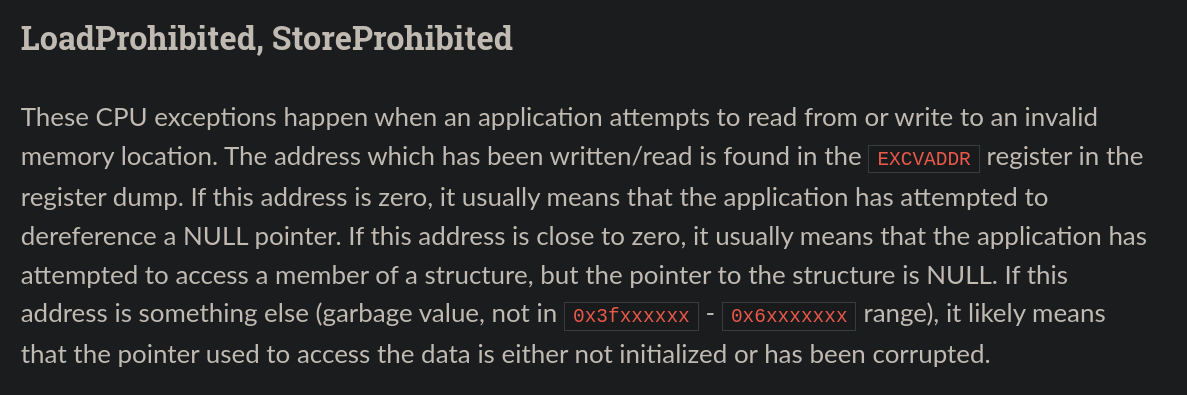
Yes, yes I know... but I had no other option. I mean, I tried making sense of the logs but they simply indicate that the firmware starts correctly, but very early in execution it attempts a misaligned or invalid memory access during heap allocation. Also the fatal errors section in the Espressif documentation didn't give me any leads to follow:
I kept reading the logs to figure out what might be wrong:
0x4012d7fe - __rustc::__rdl_alloc
    at ????:??
0x400dffba - __rustc::__rust_alloc
    at ????:??
0x400d4366 - <tuitar_firmware::transform::Transform as tuitar_core::transform::Transformer>::find_fundamental_frequency
    at ????:??
0x400d4fc9 - tuitar_core::state::State<T>::process_samples
    at ????:??
0x400de042 - tuitar_firmware::main
So it consistently crashes while executing "find_fundamental_frequency" function? I'm assuming it also calls __rustc::__rdl_alloc and __rustc::__rust_alloc which means this might be a memory allocation issue? What is that fundamental frequency function doing anyways?
I guess it might be allocating more memory than it should? I tried executing nothing in there and reflashed the firmware, but now it crashes at one of the "render" functions. Ugh... It is so strange.
So you basically moved the crash to another function?
Yes, it shows that the issue is not related to any code path, it simply happens when the execution reaches a sufficiently deep or memory-intensive call. But I still don't understand the significance of /home/orhun/gh/esp32-playground/spi_display_example/target. Maybe it has a deeper meaning and I need to become a target-directory-Guru and start meditating to understand it
Nah come on, it's just a target directory. What is in it anyways?
It simply contains build artifacts, compiled objects and a bunch of C/SDK artifacts produced by the ESP-IDF. Wait a minute... Maybe it is something caused by esp-idf-sys? It essentially downloads esp-idf, its gcc toolchain, and builds it. If something is incompatible or goes wrong then it might lead to this strange situation. Hey rat, get the tools, we're diving into the target directory.
Ahoi chef! I got meld to compare directories.
After some digging and diffing, I found the root cause:
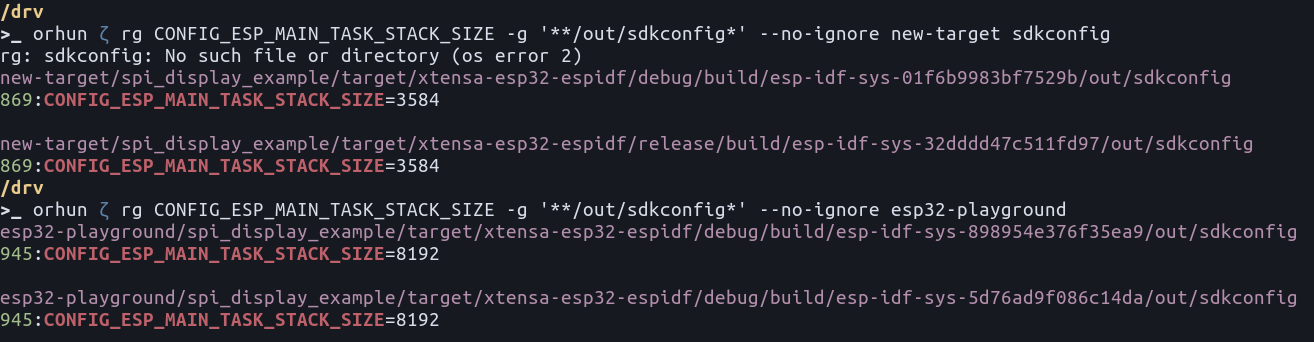
The old target directory has the stack size set to
Wait a minute... I thought we were already overriding that value in the sdkconfig.defaults file. Even the available Rust templates out there override that value to 8000, as you can see here. Why isn't that taking effect for the Tuitar firmware?
I figured out the rest by just thinking. Normal human thinking.
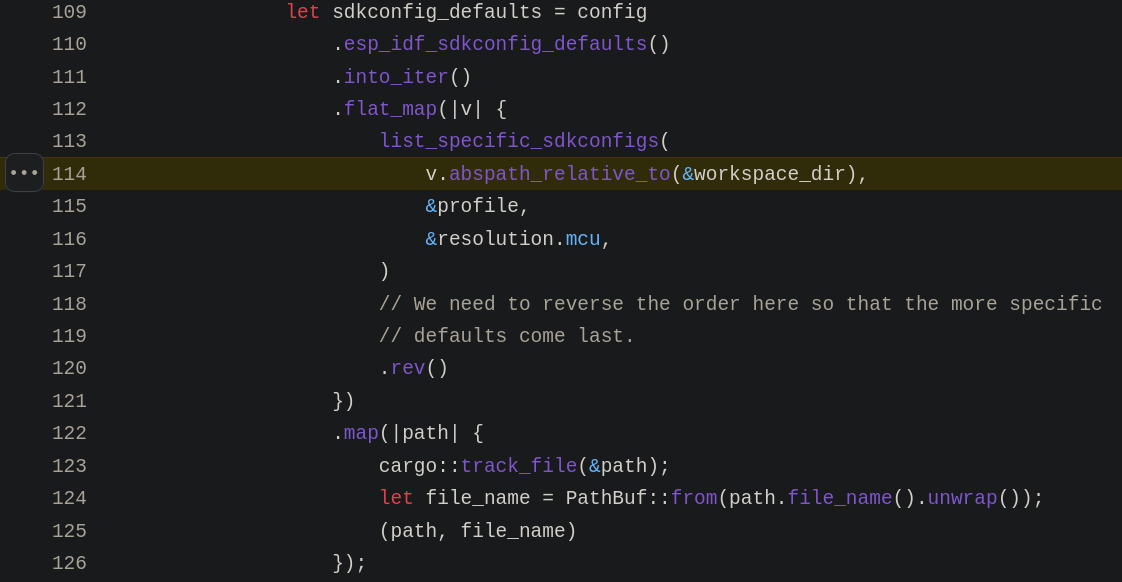
It's because firmware/ directory. And it's only being read if it is at the project root. This is not documented anywhere…
I guess I moved that file to a subdirectory while I was splitting up the project into workspace crates in the past. So the fix was simply move it back to the workspace root:
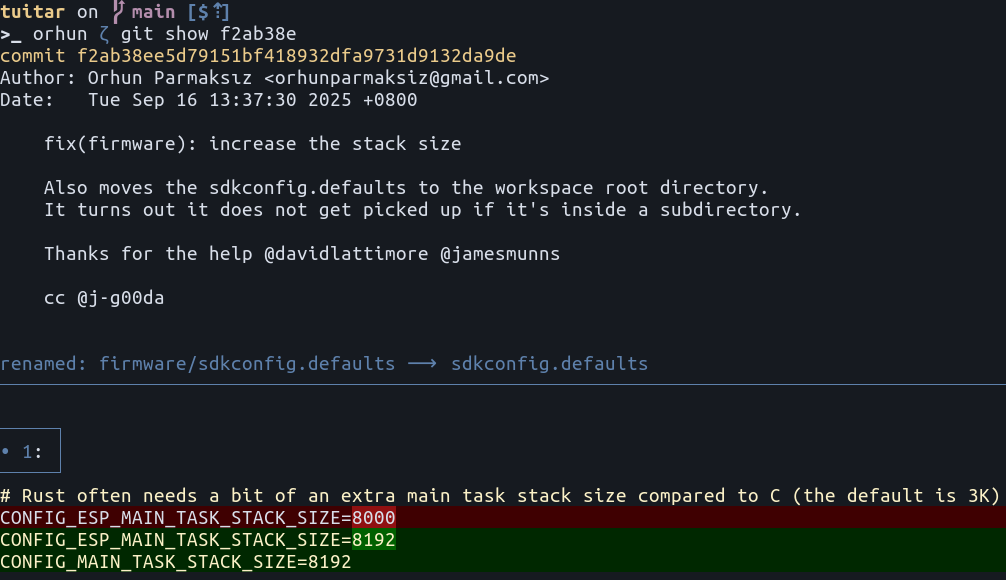
renamed: firmware/sdkconfig.defaults ⟶ sdkconfig.defaults
Time to notify the "customers":
Oh boi, finally everyone's happy.
Now, I also found the exact line in the esp-idf-sys:
Moral of the story? Maybe I should contribute to their documentation.
Tuitar GitHub: https://github.com/orhun/tuitar
Hackster article: This ESP32 Gadget Makes Guitar Practice a Breeze
Hope you enjoyed the read! 🐁